recorded operation / October 20 Demo recording
Hub filling with unwanted resources? Check Priorities
Use Priorities to choose what a placed Hub collects, then check its inventory for actual arrivals. In the October 20 Demo recording, the pictured LOW state is a paused-collection experiment, not a recommended default.
Updated 2026-11-02 · October 20 Demo recording
Recorded controls · October 20, 2026, before v0.3.9. The steps and screenshot here belong to that Demo recording.
Set a resource, then check delivery
Choose the resource in the actual Priorities tab
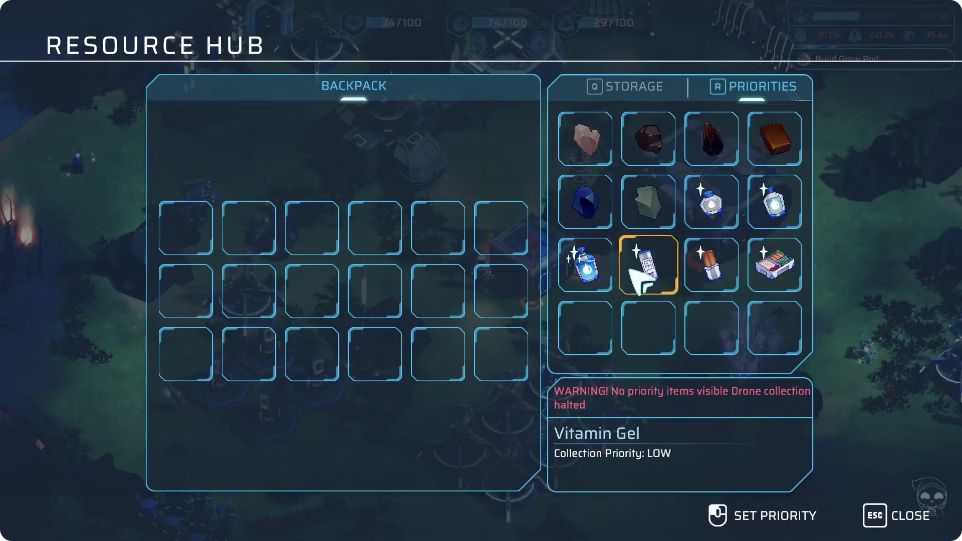
Open the placed Resource Hub and select Priorities, labeled R in the recording. Select the resource you want to adjust, use the displayed Set Priority control, then read that item’s Collection Priority text to confirm the change.
 Open full-size image ↗
October 20 Demo · 29:35. PRIORITIES is selected. Select an item, then use SET PRIORITY. This capture also shows a warning that collection is halted when no priority items are visible. Set for your next useful build, then watch the inventory
Choose the minerals needed for your next build instead of leaving unwanted collection unchecked. The recording pauses mineral collection while testing water; do not copy that LOW state as an all-purpose setup. Return to the Hub inventory after changing a setting and compare which items are being added. A priority label alone does not prove delivery.
If purified water is ready but not arriving, collect that water manually
In this October 20 example, ready water did not arrive after priorities were adjusted. The player took it manually, then restored mineral collection. That is a recovery for a specific observed situation: check that water is actually ready before treating it as a collection issue. It does not prove a current universal water bug.
What success looks like
The selected item’s Collection Priority matches your intent, useful minerals are arriving in the Hub inventory, and any already-ready water needed immediately has been collected.
If you are still stuck
If the panel or behavior differs in your build, this dated UI is not a promise of current labels. Keep production completion separate from collection, and check inventory changes after a setting change.