walkthrough / October 20 Demo recording
Resource Hub: October 20 Demo walkthrough
In the October 20 Demo recording, the route is: reach Tidehaven → activate a Drone Relay by holding E → collect its Automation Core → build a Resource Hub → set Priorities → check the Hub inventory. The screenshots and build requirements below belong to that recording, before the October 30 v0.3.9 update.
Updated 2026-11-02 · October 20 Demo recording
Recorded Demo walkthrough · October 20, 2026. The interface and exact build requirements shown here predate v0.3.9.
Follow the recorded route
Start in Tidehaven and find a Drone Relay
The second region introduces Resource Hubs. Explore for a Drone Relay, approach it, and hold E to activate it in the recorded Demo (6:10). Activating a Drone Relay supplies an Automation Core. Do not confuse this structure with the home Teleport Relay used to leave a region.
Confirm the Automation Core in your inventory
Check that you collected the Core before trying to build a Hub. The official September 25 update requires one Automation Core for each Resource Hub; a drone flying nearby does not replace that requirement.
Build the Hub: October 20 requirements
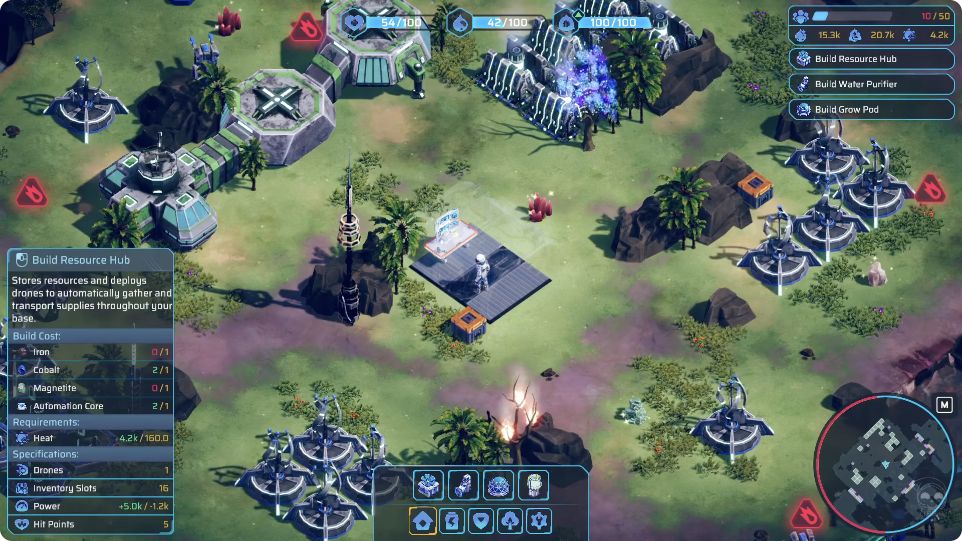
Open the building selection and select Resource Hub, as shown at 24:35 in the recording. That panel requires Iron ×1, Cobalt ×1, Magnetite ×1, Automation Core ×1 and Heat 160.0. Place the Hub after meeting those requirements. These are the demonstrated October 20 values, not a confirmed v0.3.9 recipe.
 Open full-size image ↗
October 20 Demo · 24:35. The required amounts are after the slash: Iron, Cobalt, Magnetite and Automation Core ×1; Heat 160.0. Open the full game image to see the building selection. Requirements shown at 24:35 · October 20 Demo Requirement Recorded amount Iron 1 Cobalt 1 Magnetite 1 Automation Core 1 Heat 160.0 Open the Hub and use Priorities
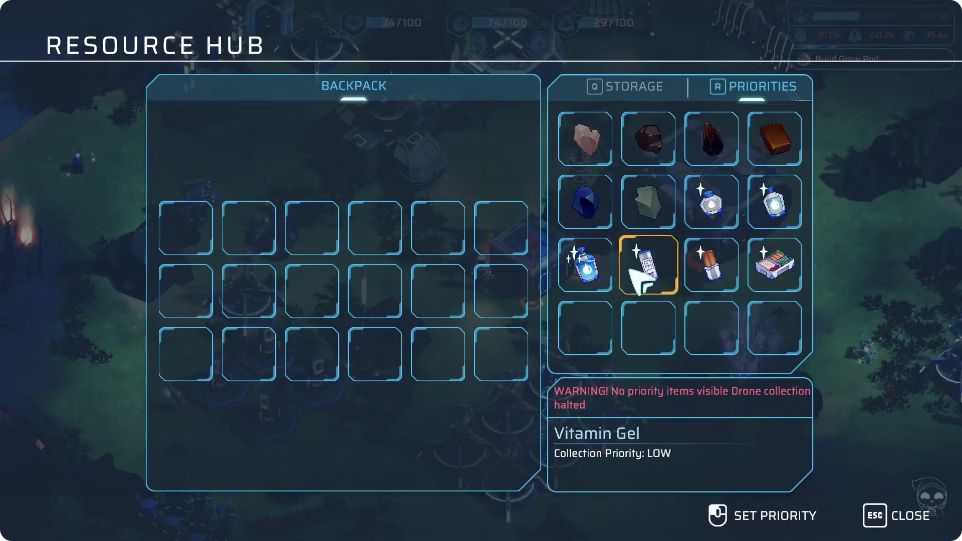
Open the placed Resource Hub and select its Priorities tab (labeled R in this recording). Select the resource you want to change, then use the on-screen Set Priority mouse control. Read back that item’s Collection Priority text to confirm the setting. The tutorial introduces this tab at 24:57; the 29:35 screenshot shows the actual selected tab and a LOW label. LOW is only this capture’s example, not a recommended default or a confirmed current-version key binding. If the panel says no priority items are visible and drone collection is halted, revise the chosen items or gather what you need manually; the screenshot is not a successful-collection signal.
 Open full-size image ↗
October 20 Demo · 29:35. PRIORITIES is selected. Select an item, then use SET PRIORITY. This capture also shows a warning that collection is halted when no priority items are visible. Check the inventory, not only the drones
Return to the Hub inventory and check whether the resource you chose is accumulating. Flying drones show activity; the requested item appearing in the Hub inventory is the useful completion check. Change one priority at a time if you are trying to work out what is being collected.
If purified water is ready but not collected
At 29:17–33:50, the recorded player prioritizes water and disables other resources, but ready purified water still is not collected. The player takes the water manually, then restores mineral priorities. Use manual collection to recover in that same situation; this one recording does not establish why it happened or whether it persists in v0.3.9.
What success looks like
For this demonstrated route, the Hub is placed, its Priorities tab is adjustable, and collected resources accumulate in its inventory. If the water branch fails, the immediate recovery is manual collection followed by restoring useful mineral priorities.
If you are still stuck
No Core: return to Drone Relay exploration. Missing a recorded material or Heat 160.0: meet that requirement before placing the Hub in this recorded build. Wrong materials accumulating: revise Priorities. Ready water not collected: take it manually. Current-version recipe and build-menu changes remain outside this dated walkthrough.
Sources & version context
Game interface images remain the work of Advance Nine. Recorded gameplay images are credited to GReimer Gaming and dated October 20, 2026.